Loadbars 0.13.0 released
Published at 2026-03-01T00:00:00+02:00
Loadbars is a real-time server load monitoring tool. It connects to one or more Linux hosts via SSH and shows CPU, memory, network, load average, and disk I/O as vertical colored bars in an SDL window. You can run it locally or point it at your servers and see what's happening right now — like top or vmstat, but visual and across multiple hosts at once.
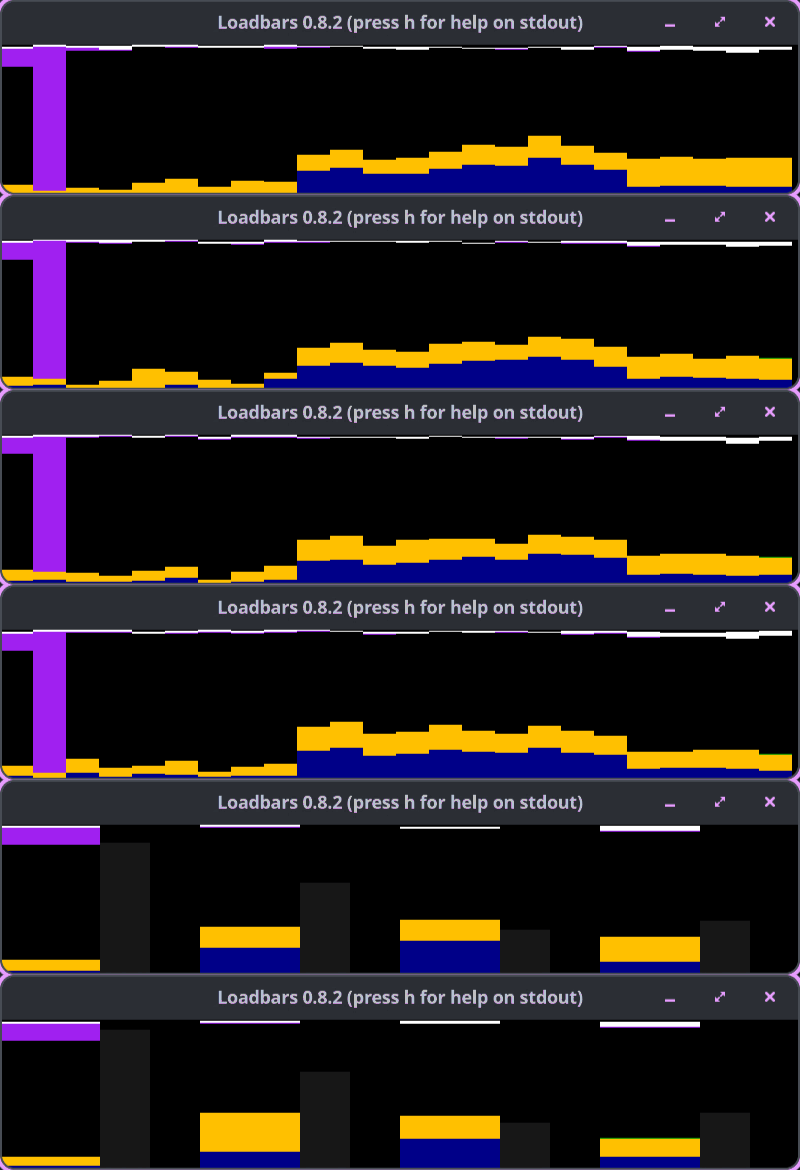
Loadbars can connect to hundreds of servers in parallel; the GIF above doesn't do it justice — at scale you get a wall of bars that makes it easy to spot outliers and compare hosts at a glance.
Loadbars on GitHub
Table of Contents
What Loadbars is (and isn't)
Loadbars shows the current state only. It is not a tool for collecting loads and drawing graphs for later analysis. There is no history and no database. Prometheus and Grafana need a lot of setup before they show anything. Loadbars is one binary plus SSH, and you see the current state right away.
┌─ Loadbars 0.13.0 ─────────────────────────────────────────┐
│                                                           │
│  ████  ████  ████  ██  ████  ████  ████  ██  ░░██  ░░██   │
│  ████  ████  ████  ██  ████  ████  ████  ██  ░░██  ░░██   │
│  ████  ████  ████  ██  ████  ████  ████  ██  ░░██  ░░██   │
│   CPU   cpu0  cpu1  mem  CPU   cpu0  cpu1  mem  net   net │
│  └──── host1 ────┘      └──── host2 ────┘                 │
└───────────────────────────────────────────────────────────┘
Use cases
- Deployments and rollouts: watch CPU, memory, and network across app servers or nodes while you deploy. Spot the one that isn't coming up or is stuck under load.
- Load testing: run your load tool against a cluster and see which hosts (or cores) are saturated, whether memory or disk I/O is the bottleneck, and how load spreads.
- Quick health sweep: no dashboards yet? Point Loadbars at a handful of hosts and see who's busy and who's swapping.
- Comparing hosts: side-by-side bars make it easy to see if one machine is hotter than the rest (e.g. after a config change or migration).
- Local tuning: run loadbars --hosts localhost while you benchmark or stress a single box; the bars and load-average view help correlate activity with what you're doing.
What's new since the Perl version
The original Loadbars (Perl + SDL, ~2010–2013) had CPU, memory, network, ClusterSSH, and a config file. The Go rewrite added:
- Load average bars: the Perl version had no load average. Now you get 1/5/15-minute load per host.
- Disk I/O bars: disk was invisible in the Perl version. You now get read/write throughput (and optionally utilization %) per host or per device. Whole-disk devices only (partitions, loop, ram, zram, and device-mapper are excluded). Handy to tell whether a box is slow because of CPU or disk. With many hosts, the disk-heavy one stands out. Disk smoothing (config diskaverage, hotkeys b/x) lets you tune how much the bars are averaged.
- Extended peak line on CPU: a 1px line shows max system+user over the last N samples. It catches short spikes that the stacked bar might smooth out.
- Tooltips and host highlight: hover the mouse over any bar to see a tooltip with exact values (CPU %, memory, network, load, or disk depending on bar type). The hovered host's bars are highlighted (inverted) so you can tell which host you're over.
- GuestNice in CPU bars: CPU bars now show GuestNice as a lime green segment (above Nice). One more breakdown for virtualized or container workloads.
- Version in window title: the default SDL title is "Loadbars <version> (press h for help on stdout)". Override with --title when you need a custom label.
- Global average CPU line (key g): a single red line across all hosts at the fleet-average CPU. With hundreds of bars you see at once which hosts are above or below average.
- Global I/O average line (key i): same idea for iowait+IRQ, to spot the hosts waiting on I/O more than the rest.
- Host separator lines (key s): a thin red vertical line between each host's bars.
- Scale reset (key r): reset the auto-scale for load and disk back to the floor, e.g. after a big spike.
- Toggle CPU off (key 1 cycles through aggregate → per-core → off): the Perl version didn't let you turn CPU bars off.
- maxbarsperrow: wrap bars into multiple rows instead of one long row.
- maxwidth: cap on window width in pixels (default 1900). Stops the window growing unbounded with many hosts; use together with maxbarsperrow for a predictable layout.
- Startup visibility flags: --showmem, --shownet, --showload, --extended, --cpumode, --diskmode (and friends) let you start with the bars you care about already on. No need to press 2, 3, 4, 5 every time.
- Window title (--title): set the SDL window title. Handy to tell several Loadbars windows apart in your taskbar.
- SSH options (--sshopts): pass extra flags to ssh (e.g. ConnectTimeout, ProxyJump). That way you don't have to change your global SSH config for a one-off session.
- hasagent: skip extra SSH agent checks when you know the key is already loaded. Avoids startup delay or warnings when you've already run ssh-add.
- Config file covers every option: any flag from --help can be set in ~/.loadbarsrc (no leading --). Perl had a config but the Go version supports the full set.
- Positional host arguments: you can run loadbars server1 server2 without --hosts. Convenience when you only have a few hosts.
- macOS as client: run the Loadbars binary on a Mac and connect to Linux servers via SSH. The Perl version was Linux-only. No Linux VM needed to watch production from a laptop.
- Single static binary: no Perl runtime, no SDL Perl modules, no CPAN. Copy one file to a jump host and run it.
- Unit tests: mage test (or go test). The Go version has proper tests.
- Window resize (arrow keys): resize the window with the keyboard (left/right = width, up/down = height). Fit more or fewer bars on screen without touching the mouse. (The Perl version had mouse-based resize; Go uses arrow keys.)
- Hundreds of hosts in parallel: the Go implementation connects to all hosts concurrently and keeps polling without blocking. The Perl version struggled with many hosts.
Core features
Load average bars
Press 4 or l to toggle. Each host gets a bar: teal fill (1-min load), yellow 1px line (5-min), white 1px line (15-min). Scale: auto (floor 2.0) or fixed with --loadmax N. Press r to reset auto-scale.
Disk I/O bars
Press 5 to toggle: aggregate (all whole-disk devices per host) → per-device → off. Partitions, loop, ram, zram, and device-mapper are excluded. Purple fill from top = read, darker purple from bottom = write. Extended mode (e) adds a 3px disk-utilization line. Config: diskmode, diskmax, diskaverage. b/x change disk average samples.
Global reference lines and options
g: global average CPU line (1px red). i: global I/O average line (1px pink). s: host separator lines (1px red). Other options: --maxbarsperrow N, --title, --sshopts, --hasagent. Hotkeys m/n mirror 2/3 for memory and network. Hover over a bar for a tooltip with exact values and host highlight.
CPU monitoring
CPU usage as vertical stacked bars: System (blue), User (yellow), Nice (green), GuestNice (lime green), Idle (black), IOwait (purple), IRQ/SoftIRQ (white), Guest/Steal (red). Press 1 for aggregate vs. per-core. Press e for extended mode (1px peak line: max system+user over last N samples).
Memory and network
- 2 / m: memory — left half RAM (dark grey/black), right half Swap (grey/black) per host
- 3 / n: network — RX (top, light green) and TX (bottom) summed over non-loopback interfaces. Red bar = no non-lo interface. Use --netlink or f/v for link speed (utilization %). Default gbit.
All hotkeys
Key     Action
─────   ──────────────────────────────────────────────────
1       Toggle CPU (aggregate / per-core / off)
2 / m   Toggle memory bars
3 / n   Toggle network bars
4 / l   Toggle load average bars
5       Toggle disk I/O (aggregate / per-device / off)
r       Reset load and disk auto-scale peaks
e       Toggle extended (peak line on CPU; disk util line)
g       Toggle global average CPU line
i       Toggle global I/O average line
s       Toggle host separator lines
h       Print hotkey list to stdout
q       Quit
w       Write current settings to ~/.loadbarsrc
a / y   CPU average samples up / down
d / c   Net average samples up / down
b / x   Disk average samples up / down
f / v   Link scale up / down
Arrows  Resize window
SSH and config
Connect with public key auth; hosts need bash and /proc (Linux). No agent needed on the remote side.
loadbars --hosts server1,server2,server3
loadbars --hosts root@server1,root@server2
loadbars servername{01..50}.example.com --showcores 1
loadbars --cluster production
Config: ~/.loadbarsrc (key=value, no --; use # for comments). Any --help option. Press w to save current settings.
Go 1.25+ and SDL2. Install SDL2 (e.g. sudo dnf install SDL2-devel on Fedora, brew install sdl2 on macOS), then:
mage build
./loadbars --hosts localhost
mage install   # to ~/go/bin
mage test
Tested on Fedora Linux 43 and common distros; macOS as client to remote Linux only (no local macOS monitoring — no /proc).
E-Mail your comments to paul@nospam.buetow.org :-)
Back to the main site